
Super Fast Inference
Notes on CUDA #1
These are my notes as I learn CUDA, here I will try to breakdown things and represent them the way it makes the most sense to me. I like to truly understand things internally, so I will try to explain it enough length to make complete sense of it.
I believe the best way to go about this is to actually write CUDA kernels ourselves and improve over time.
I will like these series to be exhaustive enough to bring any newbie upto SOTA level. I will mention blogs/books/videos as I keep learning and growing.
Note: This is an adaptive blog and I will keep adding (and sometimes removing) as I gain a better understanding of things.
Now let us begin with… understanding the hardware. Now hear me out, when it comes to CUDA. Understanding what GPU you have and how it works is equally important as understanding the code. Because these are tightly coupled.
Understanding the GPU
Now one obvious question that arises is why do we even have GPUs, aren’t CPUs enough? Can we not combine them*? Why have a separate module at all?
*interestingly this is exactly what apple did, you can understand more about it here (I remember watching a beautiful video explaining this in greater depth, I forgot about it. If you know what I am talking about, please reach out!).
This is how a CPU looks like
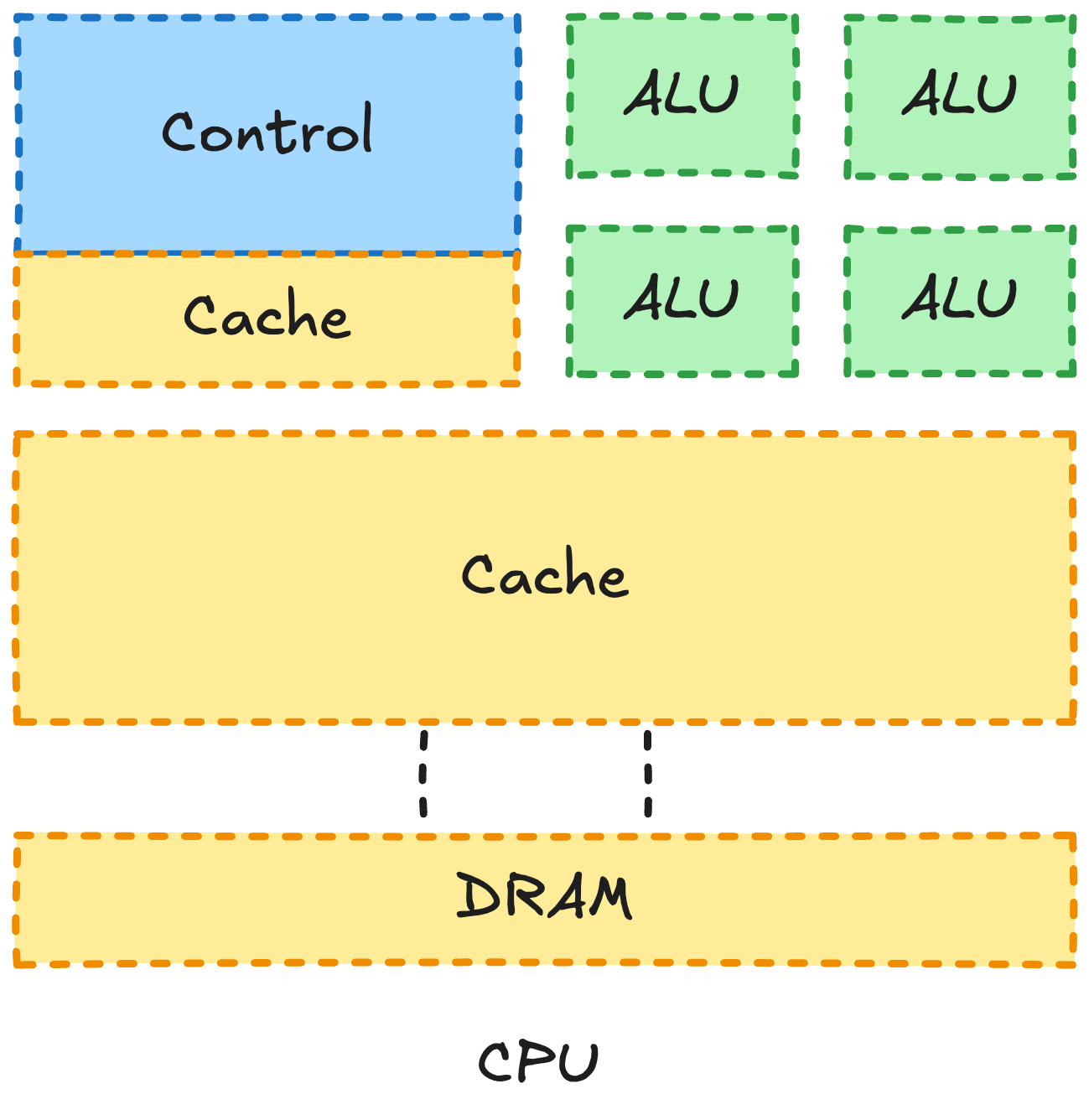 (Inspired from PMPP)
the different parts are
DRAM -> Dynamic Random Access Memory, this is where data gets stored before computation
CACHE -> Temporary memory space to store on the fly computational values
CONTROL -> Determines where to send the computation, where to store data. It’s the control center!
ALU -> Arithmetic Logic Unit, this is the part that takes care of computation.
Note: This is a gross over simplification of how CPUs look like (even GPUs when we get to it), this is meant to help you understand the core components and how they work. As we go through the blog we will gradually break down these high level components to their individual sub parts and understand how they work!
Now this is great if you want to do things in sequence,i.e one after the other. In CPUs we even have multiple cores so you can run multiple computation in parallel (multi-threading, parallelism ,and async are all different ideas consider reading this to understand the difference.)
Now imagine a matrix multiplication, the core of most of AI. It is an operation which if you think about can be run in parallel, each output value can be calculated independently of the other output values all you need is the row and column vector for that i and j values.
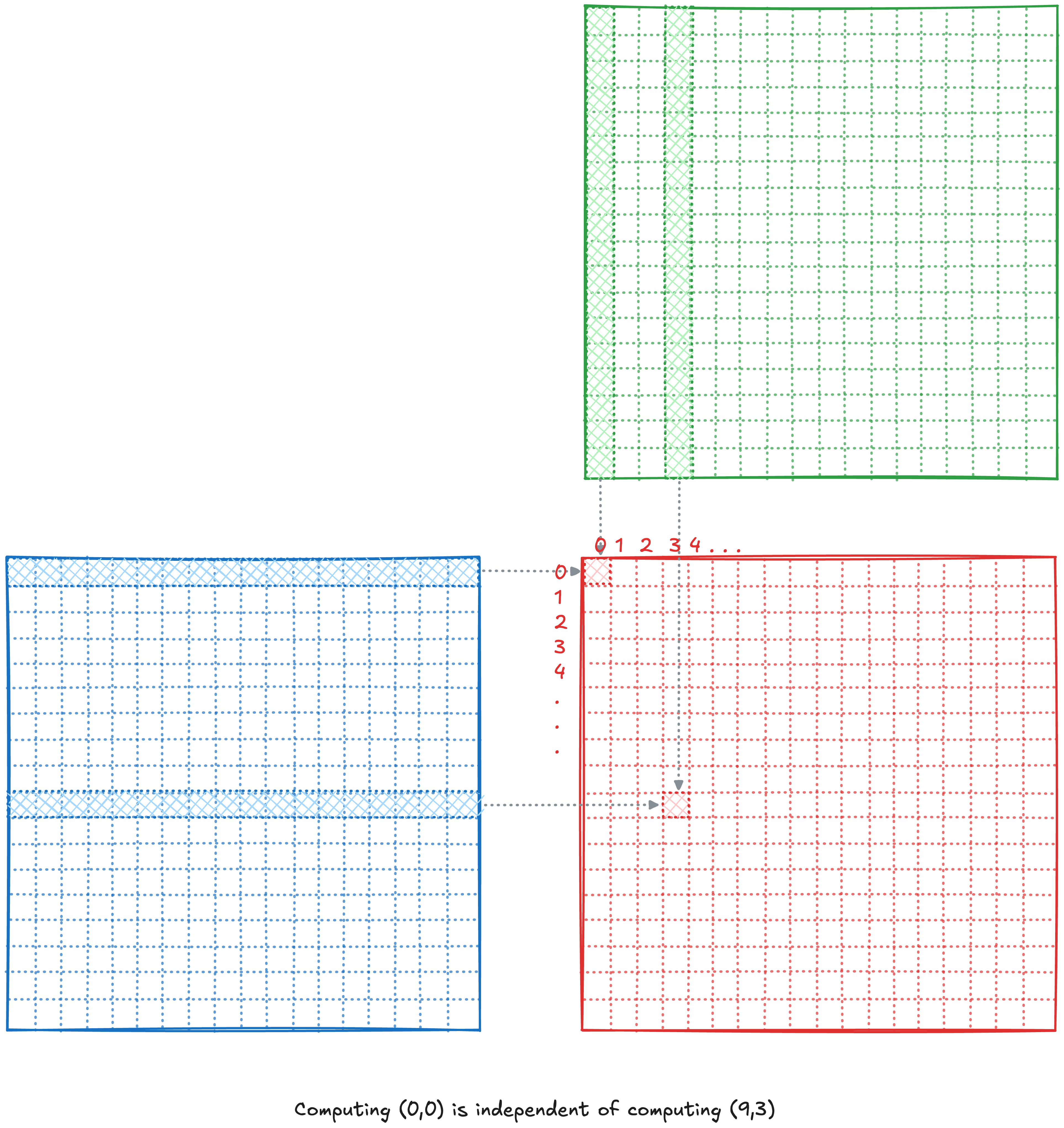
And to enable this what would we need differently from the CPU… well it isn’t hard to answer more ALUS!!! because we want to compute these values ASAP and that is why a GPU in general looks like this
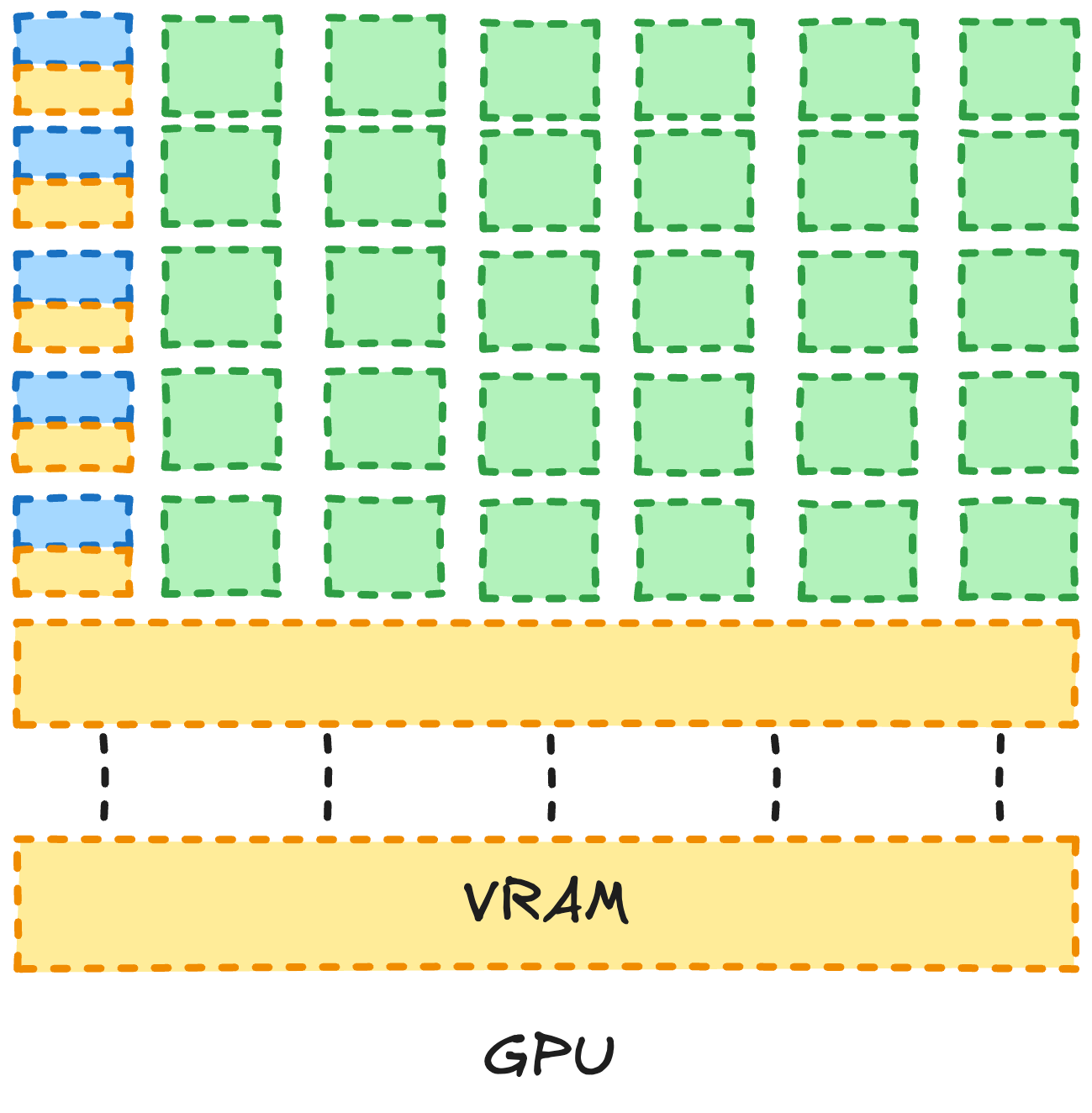 (Inspired from PMPP)
NOTE: Again, this GPU architecture is an oversimplification. But it is necessary info to get the point across. As we get more advanced, we will add on to our existing knowledge and make the diagrams more complex!
As you can see above, we have way more ALUs. Let’s understand them better by looking at what the individual parts are called. We will explore them a bit more in detail unlike the CPU section above as this blog is all about understanding GPUs and CUDA.
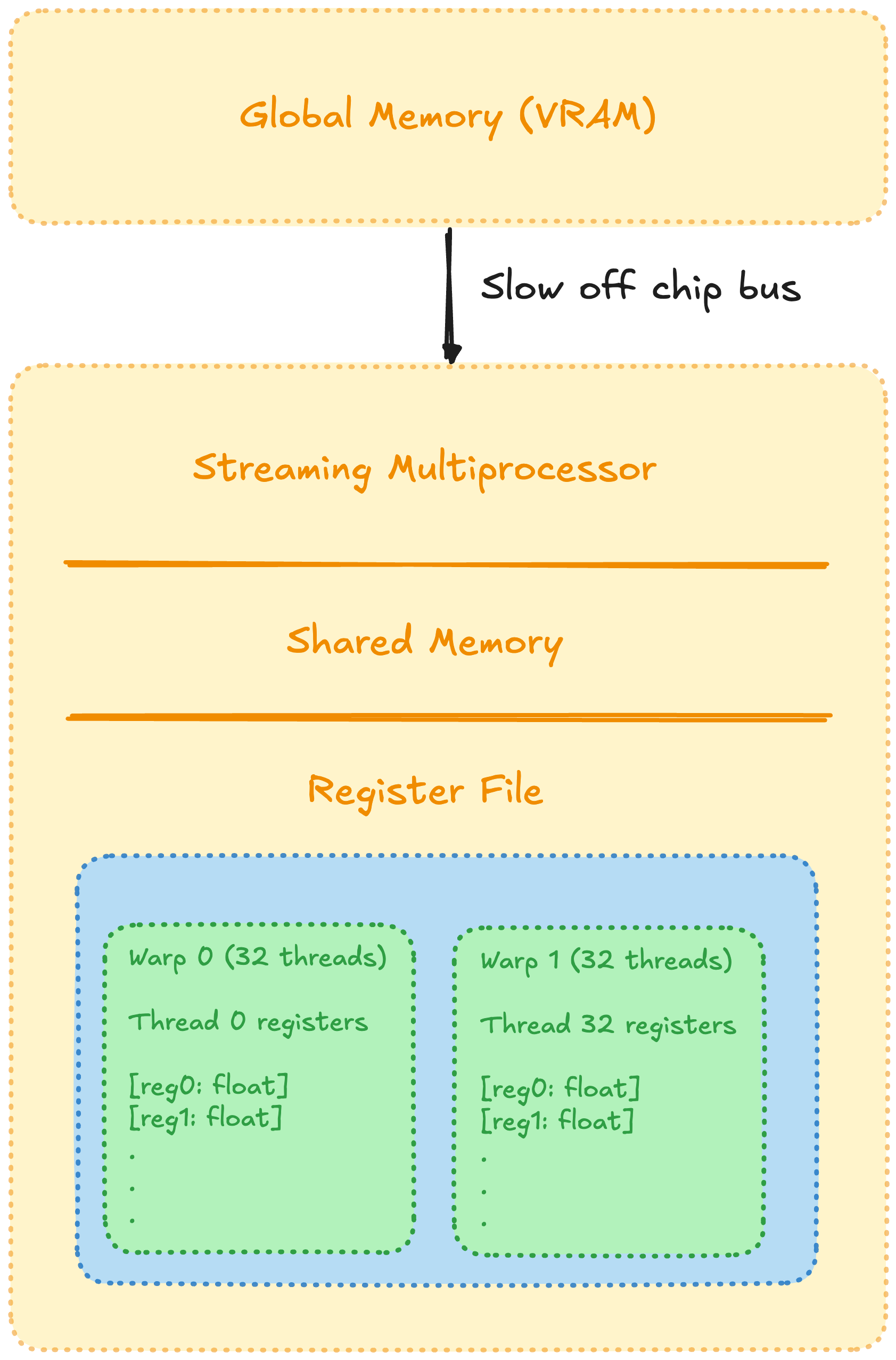 Image inspired from this blog
The most basic fact that we need to understand is that, the higher the memory storage, slower the speed. And vice versa. (I do not completely understand the reason behind it right now, but when I do. I will write it!).
Global Memory or VRAM is the advertised GPU storage, an SM (or streaming multiprocessor) has multiple parts to it like tensor cores, threads, warp scheduler and much more stuff.
For this current blog, we need not dive that much into it! So we will look at the core ideas for now. The most important thing to understand is that SMs have blocks inside of them, these blocks have threads in them, the threads of a block has access to the shared memory of that block ONLY.
All threads are arranged in a 32 thread warp! Essentially a warp runs all the threads simultaneously. (If this does not make a lot of sense right now, do not worry. As we move forward it will start making more sense!)
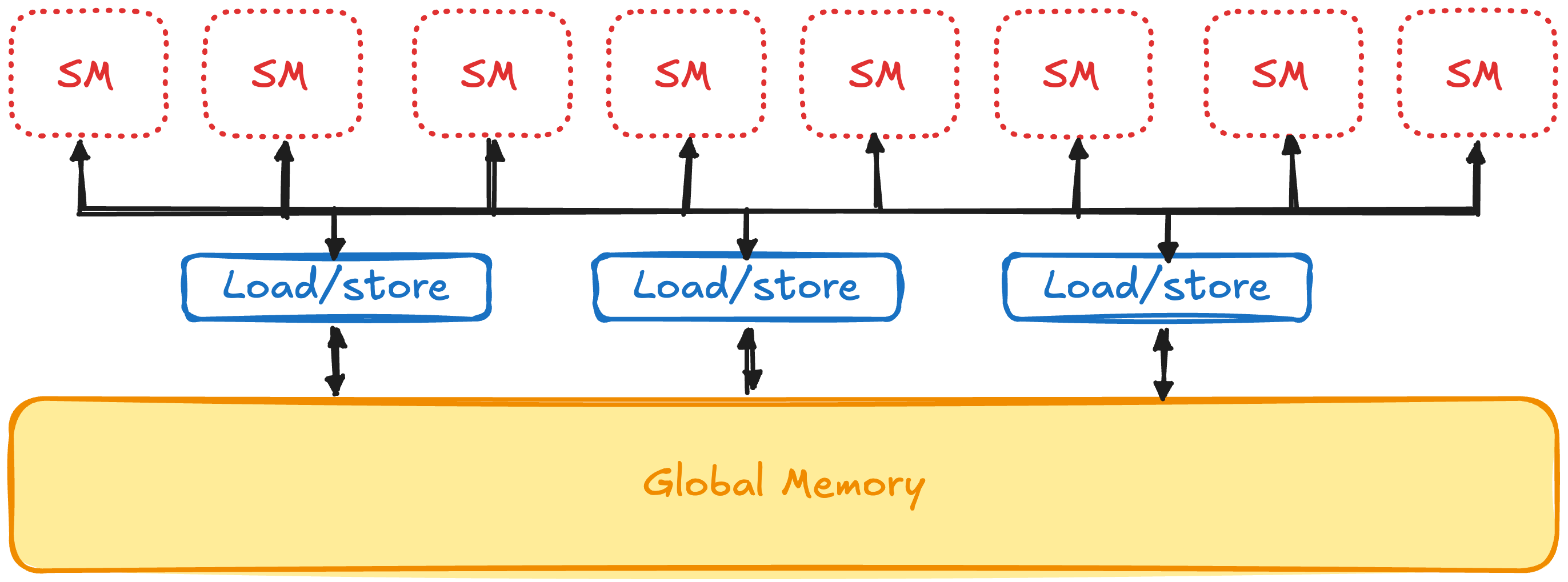
The transfer of data from global memory to an SM is an extremely inefficient operation, horace he has an amazing blog “Making GPUs go Brrr” that explains it quite well. Check it out. So ideally we would like to take our data, give it to the SM do all the necessary computation there. And only send it back once we are done computing.
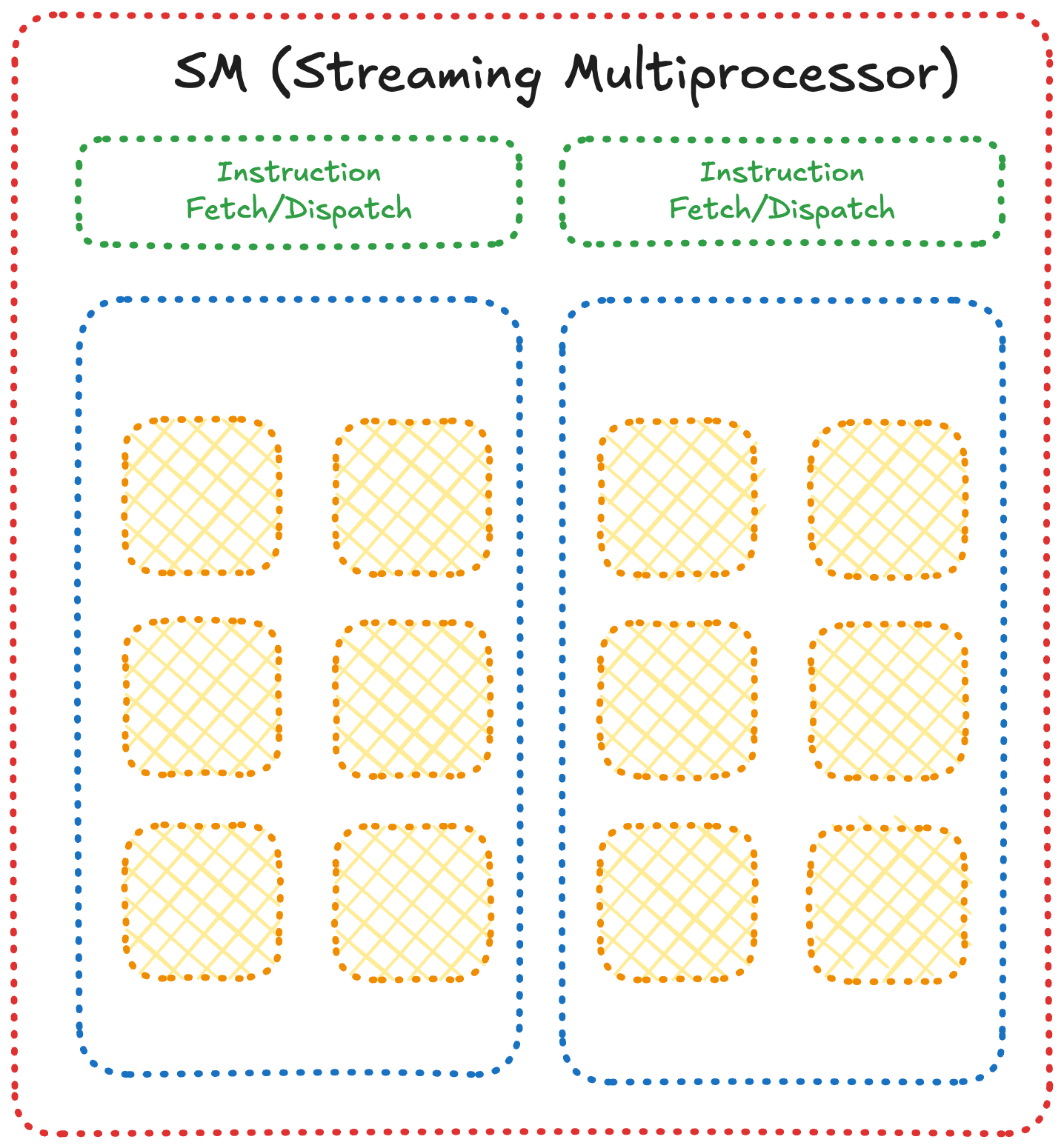
The above image is a simplification of how an SM looks like. Now we have a good general understanding of why GPUs exist and how they look like! This knowledge will prove to be useful when we start getting really knee deep into this.
Understanding CUDA
Now we can start understanding the internals of CUDA itself.
In CUDA we have grids, which have blocks inside of them, and the blocks have threads. They can be laid out in a 3d manner as presented below, but generally everyone just works with a 2d layout so we will use that majority of the time.
As I find the 1d model easier to understand as a beginner, I will use that in this part. And we will start with the multi-dimensional part starting next blog.
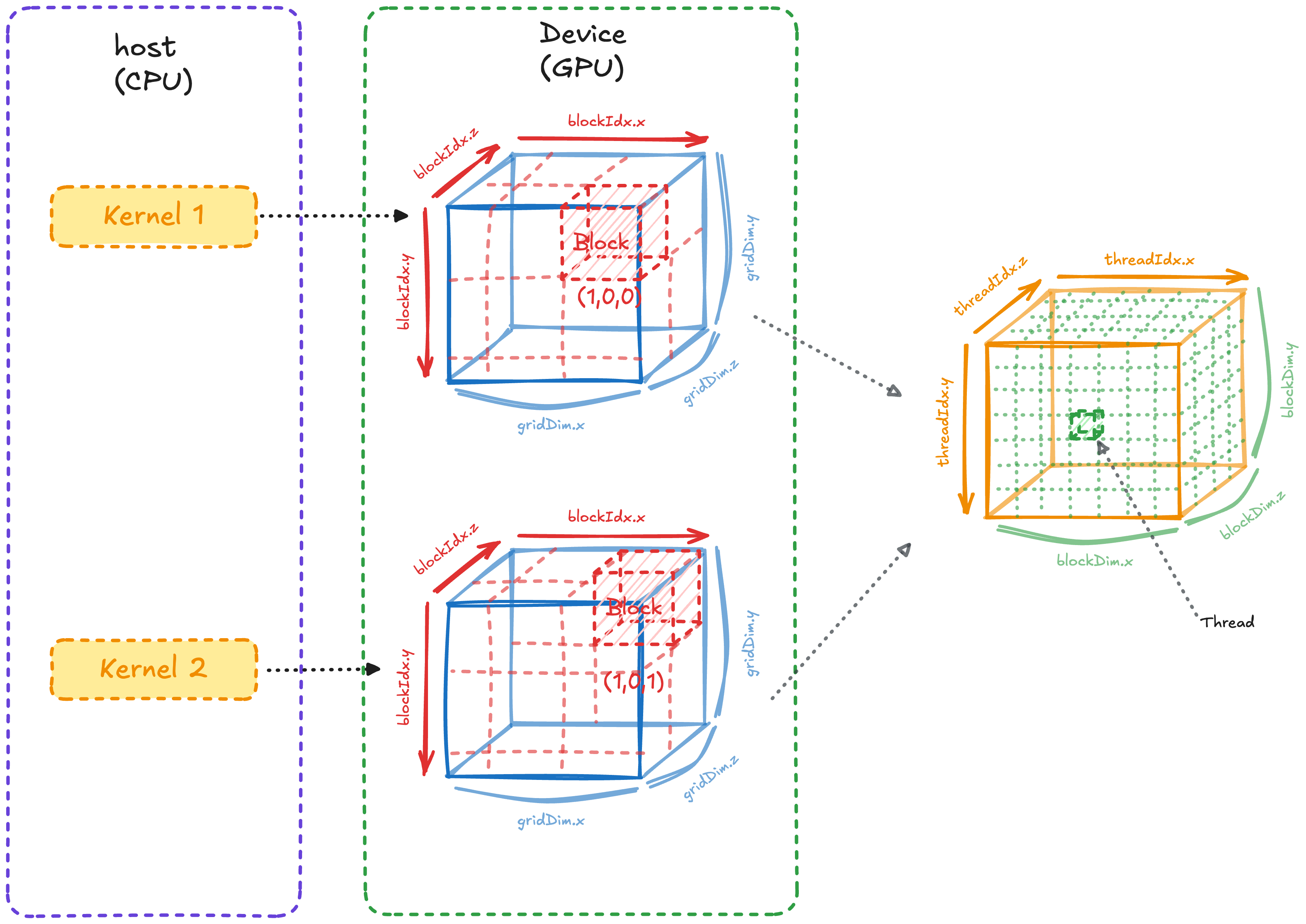
Now the above diagram can be a lot to take in while starting out, but let’s break it down component by component.
We have a host where we write the CUDA kernel which is run in the device. The host is the CPU, a kernel is essentially a function and the GPU is the device.
In a kernel we define the number of blocks in a grid, and then the number of threads in each block.
To traverse the blocks and grids, we have the dimensions and indexes. (Look carefully, you will see both are very different thing. One helps move in a direction the other defines the length of that direction)
Simple MatMul
Now let us write simple matrix multiplication in Python or CPU code, then we will write a CUDA kernel using what we have learned so far!
import numpy as np

a = 5
b = 10
c = 5

GEMM_1 = np.random.rand(a, b)
GEMM_2 = np.random.rand(b, c)

ANS_triple = np.zeros((a, c))

for i in range(a):
    for j in range(c):
        for k in range(b):
            ANS_triple[i, j] += GEMM_1[i, k] * GEMM_2[k, j]

# Both should match numpy's built-in matmul
assert np.allclose(ANS_triple, GEMM_1 @ GEMM_2)
The simplest idea that we have to keep in mind while working with cuda is that we have multiple threads, running at once, and we want to get them running simultaneously.
The worst matmul that you can write is
// A -> M X K
// B -> K X N
// output -> M X N

__global__ void super_bad_matmul_kernel(const float* A, const float* B, float* output, int M, int N, int K){
   float temp_val = 0;

   for(int i = 0; i<M; i++){
      for(int j = 0; j<N; j++){
         for(int k = 0; k<K; k++){
            temp_val += A[i*K + k]*B[K*k + j];
         }
         output[i*N + j] = temp_val;
      }
   }
}

extern "C" void solve(const float* A, const float* B, float* output, int M, int N, int K) {
   super_bad_matmul_kernel<<<1, 1>>>(A, B, output, M, N, K);
}
The above code is terrible, the main reason being we are not utilising the fact that the code can be parallelized and multiple threads can each calculate one output value. Notice that solve only launches a single thread (<<<1, 1>>>), so even though it’s running on the GPU, that one thread still does the entire triple loop by itself, exactly like the CPU version, we haven’t used any of the GPU’s parallelism yet.
Let’s write the naive CUDA solution, and then I will explain what each part does and why it looks the way it does!
// A -> M X K
// B -> K X N
// output -> M X N

__global__ void naive_matmul(const float* A, const float* B, float* output, int M, int N, int K){
   int gid = threadIdx.x + blockDim.x*blockIdx.x;
   if(gid>= M*N) return;

   int row = gid/N;
   int col = gid%N;

   float temp_val = 0;
   for(int i = 0;i<K;i++){
      temp_val += A[row*K + i]*B[i*N + col];
   }

   output[gid] = temp_val;
}

extern "C" void solve(const float* A, const float* B, float* output, int M, int N, int K) {
   int threadsPerBlock = 256;
   int blocksPerGrid = (M*N + threadsPerBlock - 1)/threadsPerBlock;

   naive_matmul<<<blocksPerGrid, threadsPerBlock>>>(A, B, output, M, N, K);
}
The above one although not a great implementation shows the value. There is one idea that we have not talked about so far which sits at the center of CUDA. And that is the actual memory layout of the data is one dimensional and it is stored in a row major form.
We know that our output will be of the shape, MxN. But in memory we cannot have 2d layouts, we only have 1d. So instead of a MxN layout we have M rows of N values stacked after each other, which looks something like the below image.
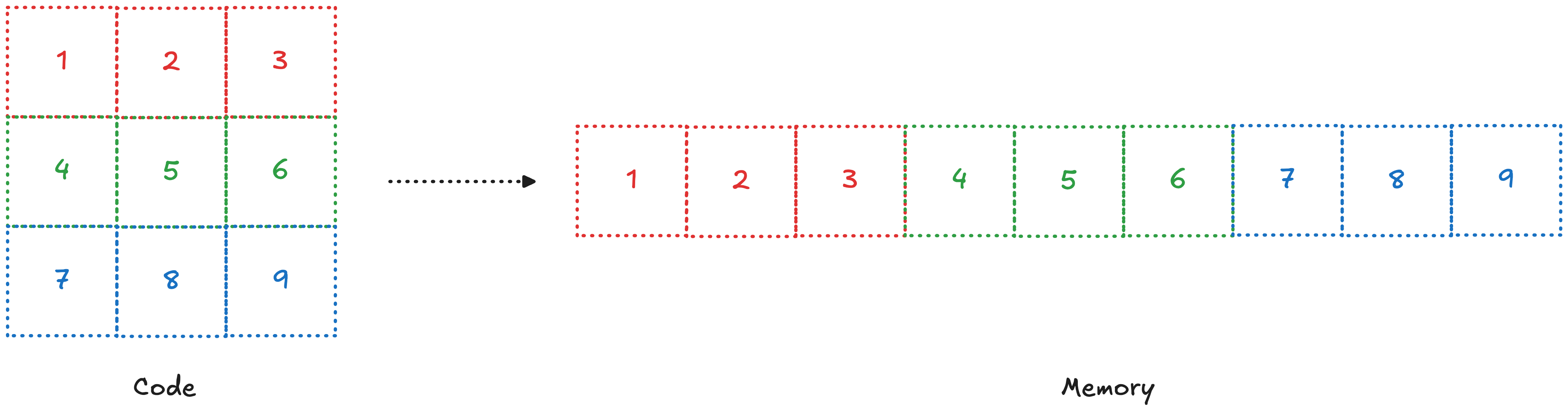
(You can imagine the similar for 3d)
Hence, if we breakdown gid (I like to call it global id; tid, or thread id, is the number of the thread within a block, and since we have defined the block size as 256, tid will never exceed that). It consists of threadIdx, blockDim, and blockIdx. Idx means index and dim means dimension.
It is important you visualize and understand how this is working; threadIdx gives you the current thread you are on in a block. Multiplying the block index (blockIdx) by the block dimension (blockDim) tells you how many threads came before this block.
A good way to understand is by thinking backwards. We want each thread to calculate one value. So we need MxN threads. Which is not possible.
So we set 256 threads and then we define the number of blocks based on this, that is where the ceiling equation comes from
blocksPerGrid = (M*N + threadsPerBlock - 1)/threadsPerBlock;
this will give us enough blocks with enough threads to take care of this computation, now as this is a ceiling function we can have a number of threads which exceed MxN. And hence the reason we have added a check
if(gid>= M*N) return;
read this part a few more times, try to think it in your terms and it should make sense!
Where do we go from here?
If you would like to put the knowledge you have acquired to the test, I will recommend checking out
This was a real simplification of a lot of ideas, in the next part we will understand what are bottlenecks in a CUDA code, how do we identify it and how we can optimize it. Along with understanding the relevant parts of the GPU for it.
Also if you have read this far, I will just assume you liked it. So you and I are essentially friends at this point, and as a friend. Consider helping me and your other friends by sharing it with them!
Comments